Table of Contents
Personalize your Shopify products
Install for freeAugust was packed with updates that brought more creative freedom and a smoother Customily experience. We introduced Pattern Repeat for creating seamless repeating designs, launched a new Customily interface inside Shopify, and added Text Along Path for even more control over creative text layouts. We also released Crosswords 2.0, giving merchants much more flexibility to create and customize personalized crossword designs.
Let’s dive into what’s new! 🚀
Customily is now available directly inside Shopify 🎉
We’ve launched a new Customily experience directly inside the Shopify Admin, bringing Customily closer to the Shopify experience you already know.
You can now access key Customily areas like Products, Designs, Product Bases, Templates, Option Sets, Orders, Libraries, and Settings directly from your Shopify store, with a refreshed interface that matches Shopify’s look and navigation. While the interface is new, the core Customily workflows you know remain the same. You can still create and personalize products, manage your designs and templates, set up Option Sets, manage orders, and more.
And if you prefer the full Customily experience, you can still access it at any time.
👉🏻 Learn more about the new interface here!
Pattern Repeat for Text Box Elements 🔠
Create repeating text patterns across the entire canvas in just a few clicks.
What's new
- Added a new Pattern section when selecting a Text Box element.
- Generate a pattern that automatically centers the selected text and fills the entire canvas with linked duplicates.
- Adjust the spacing between pattern instances to customize the layout.
- Use Refresh to Fill Page to regenerate missing instances after resizing the base element.
👉🏻 Learn how to set it up here!
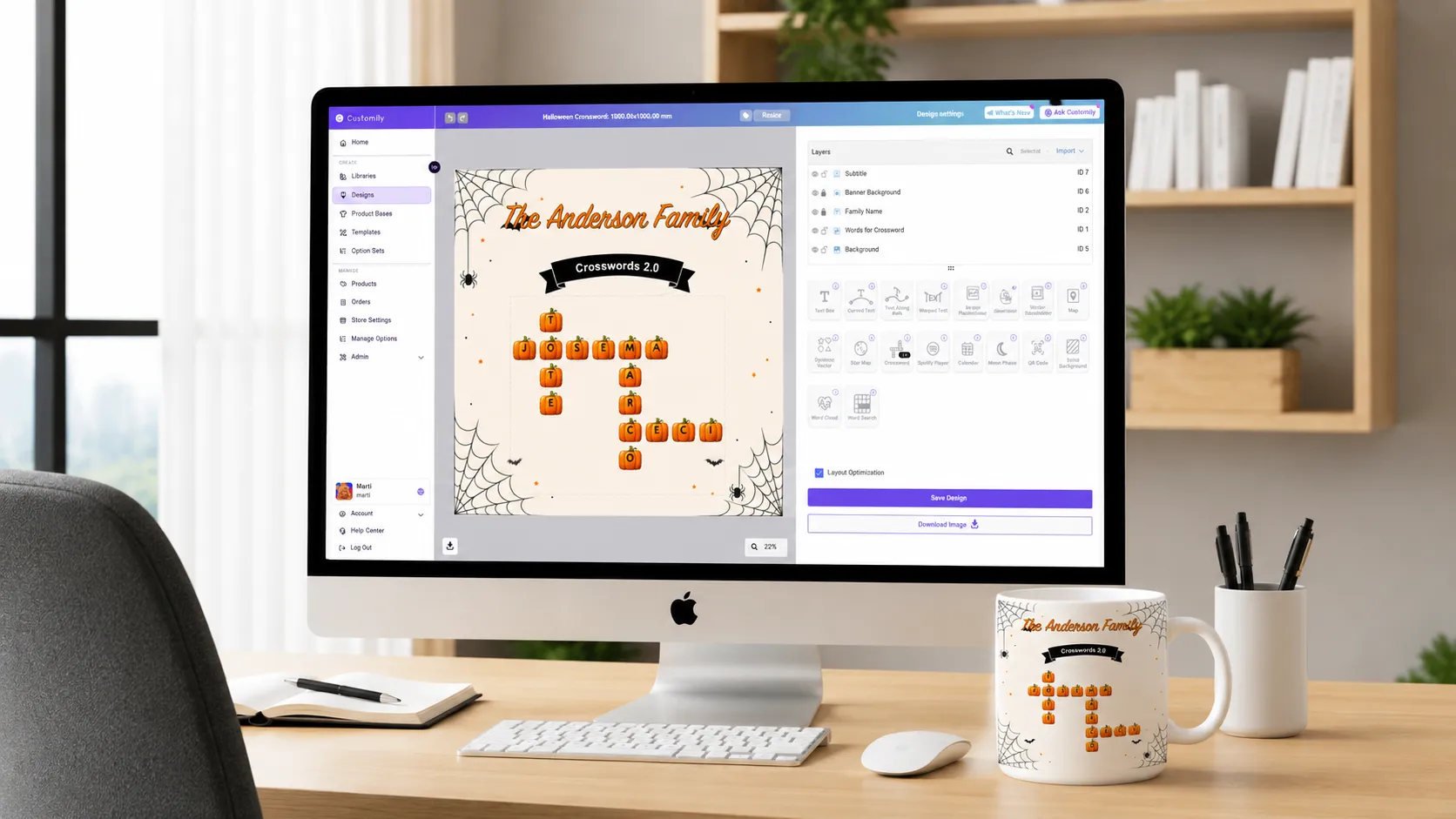
Crosswords 2.0: Break Free From the Same-Tile Look 🧩
Crosswords have always been one of the most popular personalization formats on Customily, but until now, every tile looked the same, same background, same font, same color, no matter what the piece was for. Crosswords 2.0 changes that: merchants can now design tile styles that actually match the theme of the piece, and shoppers get to build genuinely distinctive, personal designs instead of a generic grid of letters.
What's new
- Set your own tile styles
- Offer styles as shopper options
- Mix styles within the same design: Alternate mode
- No language limits
👉🏻 Learn everything about this awesome update here!
Add Shadows to Image Uploads ✨
You can now add Drop Shadows and Blurred Shadows to Image Uploads, giving you more control over how uploaded images look in your designs.
Just like with Text Shadows, you can customize:
- Color: Choose the shadow color option
- Offset: Control how far the shadow sits from the image
- Angle:Adjust the shadow direction
- Blur: Set how soft or sharp the shadow looks
A Better Way to Use Image Masks 🎭
We’ve made a few improvements to Masks for Image Placeholders to make them easier and faster to use.
You can now:
- See the applied mask clearly
- Choose from pre-made shapes
- Reuse your own shapes
Design Element: Text Along Path 🆕
Create eye-catching text designs with our new Text Along Path element! ✨
Add text that follows a curve or custom shape, giving you more flexibility to create unique and creative designs.
👉🏻 Learn how to set it up here!
Lock Image Movement and/or Scaling 🖼️🔒
Now Image placeholder has setting to lock movement and/or scaling. this is useful to fix size and/or position. Dynamic image can be locked in scaling when movement is enabled.
Useful when:
- You want the shopper to be able to move the image but not resize it → use Lock Scaling.
- You want the shopper to be able to scale the image but keep it fixed in position → use Lock Movement.
- You want the image completely fixed — no moving, no resizing → enable both Lock Movement and Lock Scaling.
👉🏻 Learn how to set it up here!
Need Help?
Our team is always here for you. If you have any questions or want to see these features in action, just reach us at support@customily.com.
Try all our new features now inside Customily Studio and let us know what you think 🤩
Happy customizing! ⭐


.webp)