Table of Contents
Personalize your Shopify products
Install for freeJanuary marked a fresh start! After the holiday code freeze. With peak season behind us, we began rolling out new features and improvements designed to help merchants move faster, scale with confidence, and unlock new personalization possibilities in 2026.
Let’s dive into what’s new! 🚀
Design Studio UX/UI Improves 💜
✅ Add Stroke Button for Texts
- Before the stroke section was always "opened" and users would confuse it for fill color options.
- Now to add stroke, users must click on ADD STROKE, making the feature a lot easier to use. This doesn't change how the stroke width or color options work, its a simply UX change to make it clearer for beginners.
✅ New Transform Buttons: Bring to Front / Send to Back
- Before we only had Bring Forward and Send Backwards (they would only move up or down 1 layer).
- Now we have Bring to Front & Send to Back, these move layers to the extremes making it faster to manipulate. (Available through the right click menu and the Transform section)
✅ New AI Models for Open AI
Merchants can now select which model to use, when applying image effects using Open AI.
The available models are:
- gpt-image-1: slower but better results generally
- gpt-image-mini: cheaper image generation
- gpt-image-1.5: faster image generation
✅ More Gemini Image Effect Settings
Before, gemini image effects could only be modified using a prompt. Now merchants can control:
- AI Models: You can now choose to use either 2.5 Flash Image or 3 Pro Image Preview.
- Choose Aspect Ratio: Now you can choose from Gemini's selection of ratio outcomes, there's a lot to choose from, so they can better adapt to your design's structure. For example: 1:1 for square images or 9:16 for vertical images.
- Choose Image Size: Choose the image outcome resolution, ensuring high quality image outcomes. No need to use the Enhance Photo filter we talked about in our previous call. For the 3 Pro Image Preview model only, you can choose from 1K / 2K / 4K.
✅ Product Settings (Override Store Settings Button)
- Store Settings generally apply to your entire store, but merchants would like to be able to customize settings specifically for some products. That's why we introduced the Override Store Settings button, where we'll be adding some of the Store Settings sections for merchants to customize on a product-level.
✅ New Keywords added for Automatic Product Base Variant Switch
- Before, product base variants must contain only these keywords in order to automatically switch on Storefront.
- Now, they can also contain the words: FRAME, WIDTH, COLOUR
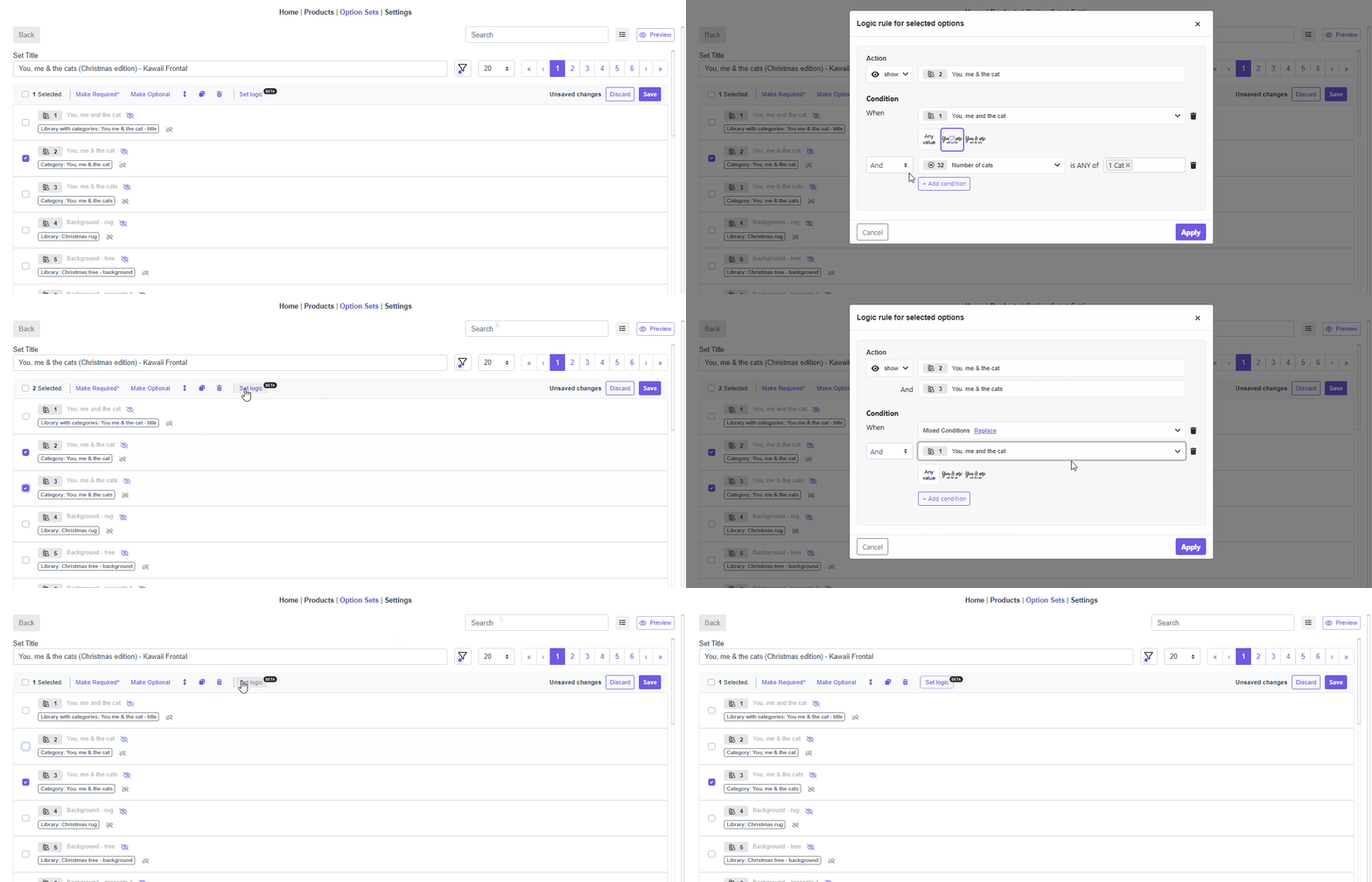
✅ Option Sets: Set Logic in Edit Mode
What’s new? You can now not only add conditions in bulk, but also edit existing conditions from the modal shortcut, either individually or in bulk.
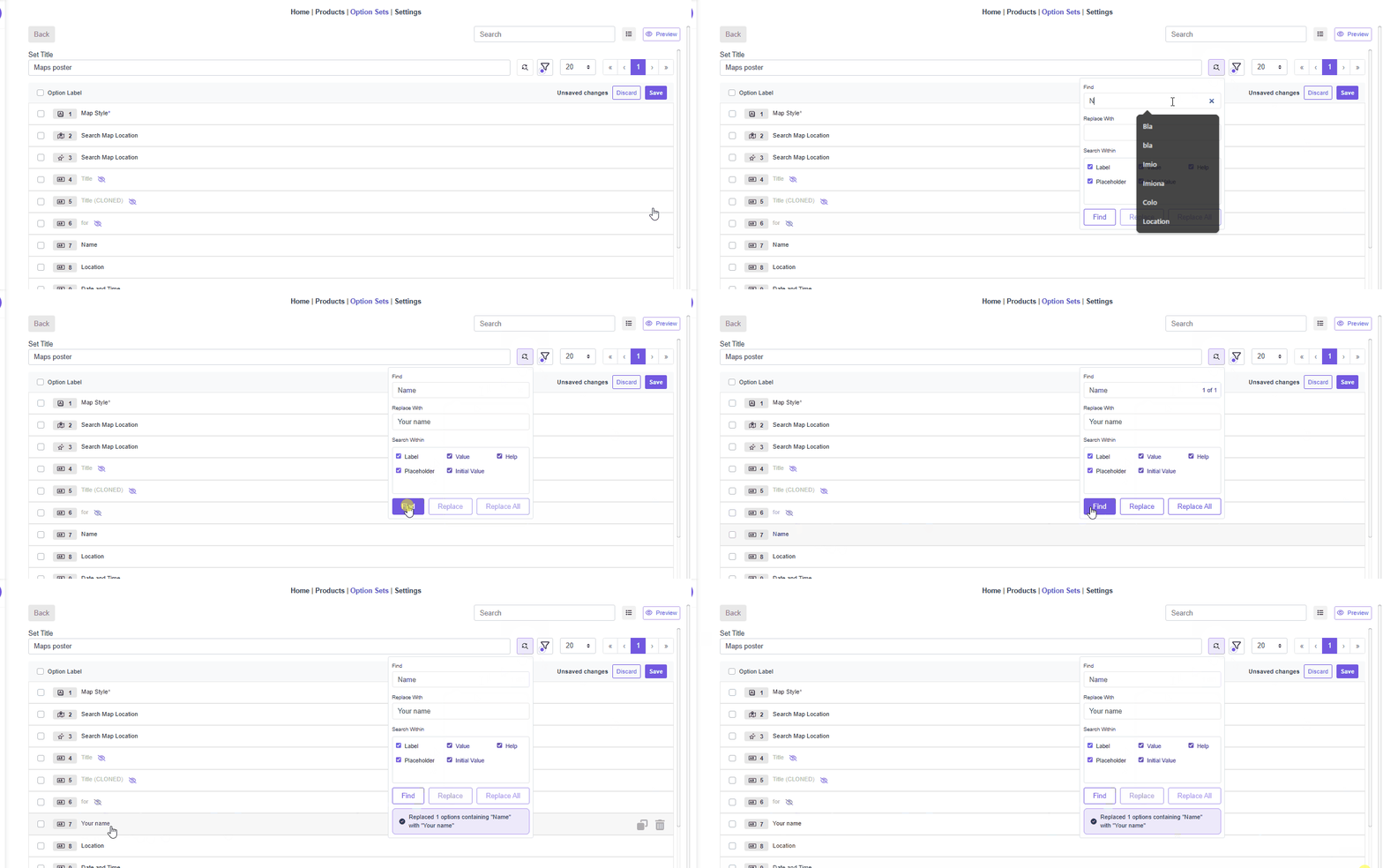
✅ Option Sets: Find & Replace
How does it work?Pretty much like Find & Replace in Google Sheets. It finds the text you’re looking for, and you can replace it one by one or update all occurrences at once.
Nano Banana Mockups for Etsy Stores 🧡
Etsy store owners can now generate mockups for their product using the same nano banana feature we've had for Shopify and Woocommerce. This feature is only available (for now) on the product page, but will soon be available when creating a new product as well.
With Etsy it's always recommended that they sync their products before performing any changes, in case they replace images they haven't yet synced to Customily.
👉🏻 Learn more about AI Mockups here!
Need Help?
Our team is always here for you. If you have any questions or want to see these features in action, just reach us at support@customily.com.
Try all our new features now inside Customily Studio and let us know what you think 🤩
Happy customizing! ⭐