Table of Contents
Personalize your Shopify products
Install for freePersonalized products allow e-commerce sellers to offer unique items that customers can customize with names, photos, messages, colors, and more.
However, as personalization becomes more powerful, the number of customization options also increases.
A product might include:
- Multiple photo uploads
- Several text fields
- Color selectors
- Character or icon choices
- Layout variations
When all of these options appear in a single long list, the experience can quickly become overwhelming for shoppers, especially on mobile devices.
To solve this, we’re introducing a new feature in Customily designed to make personalization easier to navigate.
Sections for Option Sets are now available.
What Are Sections?
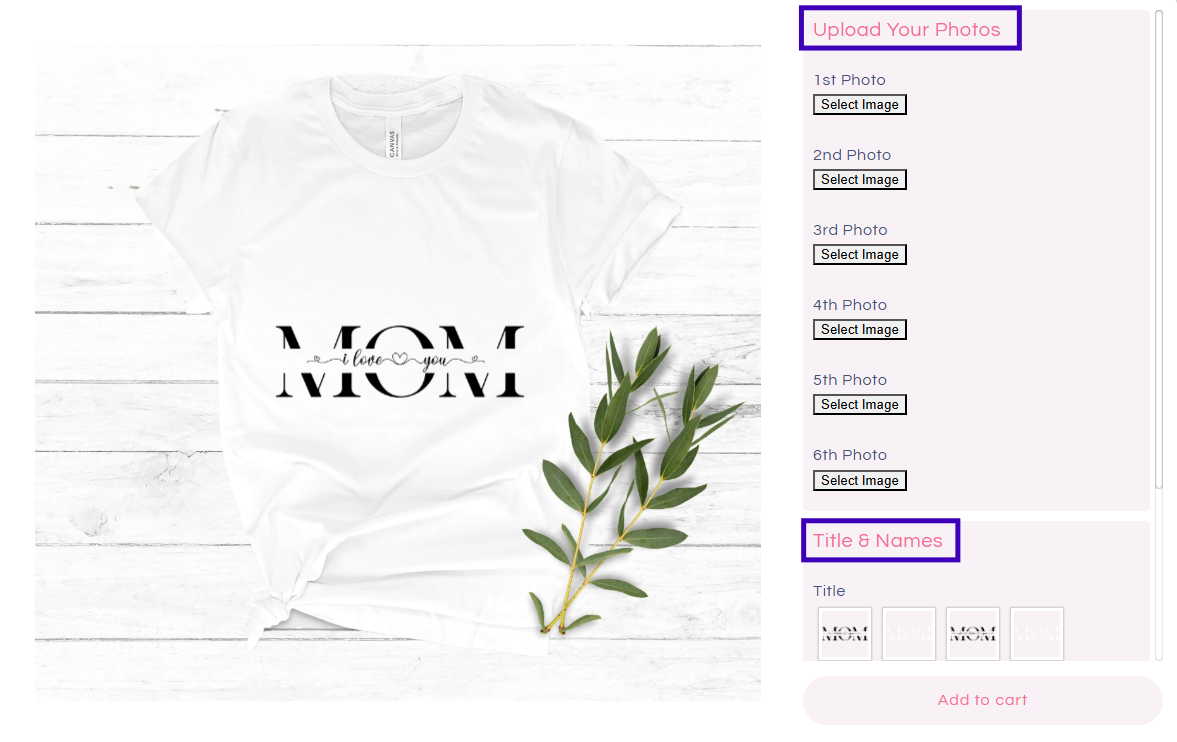
Sections allow merchants to group customization options together under a shared title, creating a cleaner and more organized personalization experience.
Instead of displaying all inputs in one long list, you can divide them into logical groups.
For example:
- Upload your photos section
- Title and names section
- Clipart section, and more.
How to Create Sections in an Option Set
Inside your Option Set, you can now add and manage sections directly.
Merchants can:
- Add new sections
- Assign a name to each section
- Drag and drop options under each section
- Remove sections if needed
This allows merchants to structure complex personalization flows without changing the design itself.
For example, a personalized photo product could be structured like this:
- Section 1: Upload Photos
- Section 2: Add Text
- Section 3: Customize Colors
This organization makes the customization process clearer for customers and easier to manage for merchants.
.png)
Customizing Section Styles in Store Settings
Sections can also be visually customized to match the design of your store.
Inside Store Settings → Styles, merchants can control the appearance of sections.
Available styling options include:
- Background color
- Title color
- Title font size
- Padding
- Border radius
These styles apply to both desktop and mobile storefront previews, helping merchants keep a consistent visual experience across devices.
How Sections Appear in the Storefront
Sections are visible to shoppers when they personalize a product in the store.
They work across different Customily preview styles, including:
- Product Page Preview
- Modal Preview
This means merchants can organize customization options without changing how their storefront preview works.
On desktop product pages, sections appear as grouped customization blocks next to the product preview, making the interface cleaner and easier to scan.
In modal previews, sections appear within the customization panel while the product preview remains visible, keeping the design experience clear and interactive.
These layouts help shoppers focus on one group of options at a time.
A Better Mobile Personalization Experience
Mobile personalization often becomes difficult when too many options appear on the screen at once.
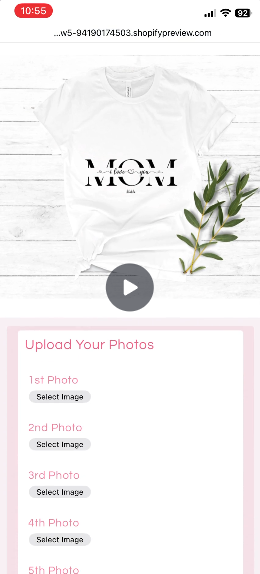
Sections improve this experience by allowing customers to navigate customization in a more structured way.
On mobile devices, Customily supports different preview modes, including:
- Mobile Product Page Preview
- Mobile Modal Preview
- Mobile Modal Preview with Collapsible Menu
When Sections are used together with the collapsible mobile options menu, shoppers can move through personalization step by step instead of scrolling through a long list of inputs.
This creates a smoother and more intuitive customization experience on mobile devices.
What’s Coming Next
Sections will continue evolving with additional improvements that make the customization process even more structured.
Upcoming updates include:
- Accordion Style Sections: Allowing sections to collapse and expand for a cleaner interface.
- Navigation Buttons for Step-by-Step Flow: Helping shoppers move between sections during personalization.
- Order Numbers for Sections: Allowing merchants to display a numbered step sequence for the customization process.
- Making Sections available for other platforms: For now, this feature is only available for Shopify stores.
These features will further improve the step-by-step personalization experience in Customily.
A Simpler Way to Structure Personalization
As personalized products become more sophisticated, organizing customization options becomes increasingly important.
Sections for option sets help merchants structure complex personalization experiences into clear and manageable steps.
For shoppers, this means a simpler customization flow. For merchants, it means a cleaner and more scalable way to offer personalized products.
And that makes the entire personalization experience easier for everyone 💜