Table of Contents
Personalize your Shopify products
Install for freeMay was a milestone month for personalization and automation. We announced Customily × Amazon Print File Services, bringing live personalization and automatic print file generation to Amazon sellers. At the same time, we launched Multi Image Upload, giving shoppers the ability to upload and personalize multiple photos within a single product experience. Together, these updates help merchants create richer products while simplifying production and fulfillment workflows.
Let’s dive into what’s new! 🚀
Customily x Amazon: Print File Service 🖨️
Selling on Amazon with Amazon Custom? This is for you.
Welcome to the Customily Amazon Print File Service: the easiest way to turn Amazon customization data into production-ready print files automatically.
Connect your Amazon Custom orders, send the customization data to Customily, and generate print-ready files in minutes.
✨ Automate your workflow
📦 Ready for fulfillment
⚡ Faster production
🎨 Built for personalized products
Multi-Image Upload 🖼️
We’ve introduced a new option type that makes image uploads a lot simpler for both you and your shoppers.
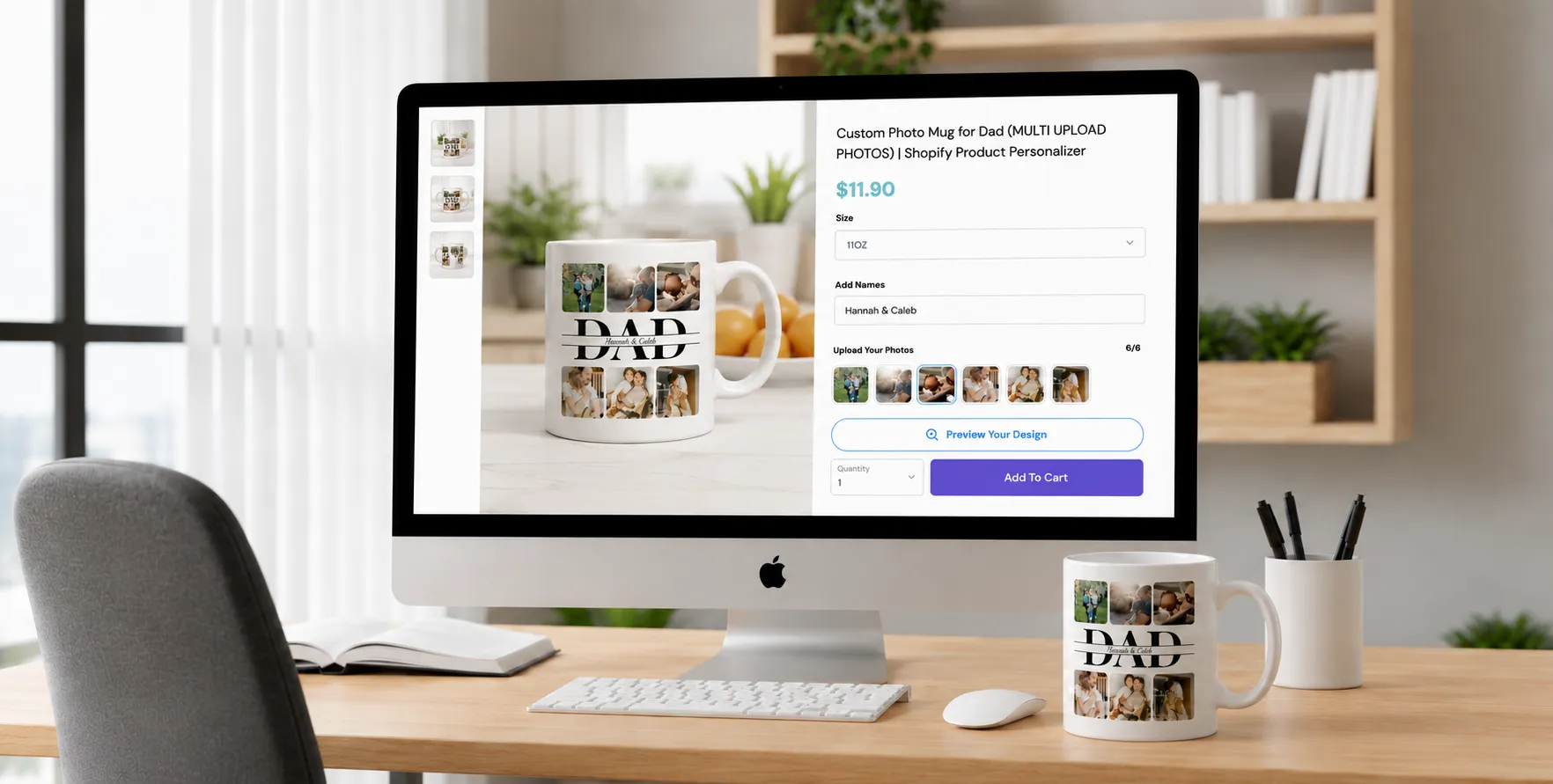
With Multi-Image Upload, you can now handle multiple image uploads from a single option, reducing setup complexity and improving the personalization experience. Previously, each image upload required its own option with a single upload field. This could quickly become overwhelming, especially for products that required multiple images like collages.
Now, you can group everything into one streamlined option, making the flow faster and more intuitive.
What’s new?
- Upload multiple images at once from a single option
- Assign multiple Image Placeholder IDs to that option
- Shoppers can add, remove, and swap images easily
This is especially useful for products like photo collages, where multiple images are part of the design.
👉🏻 Learn how to set it up here!
Swatch Layout Options 🟣
We’ve added more flexibility to how your swatches are displayed, helping you make better use of space in the personalization flow.
What’s new?
You can now choose between two layout styles for both color swatches and text swatches:
- Wrap: the classic layout, where swatches flow into multiple rows
- Horizontal: a side-scrolling carousel that keeps everything in a single row
Why this matters: The new horizontal layout helps reduce vertical space, making the customization experience cleaner and easier to navigate, especially for products with many options.
👉🏻 Learn how to set it up here!
Rate Limit for AI Integrations 🤖
You can now set usage limits for AI-powered integrations like OpenAI, Google Gemini, OpenRouter, Cutout Pro, and more.
This new Rate Limiter helps prevent abuse, bot activity, and unexpected API overuse on your products using Image Effects.
How does it work?
Rate limits are configured individually per integration. For each provider, merchants can define:
- Attempts per IP: how many requests a shopper can make
- Retry After (minutes): how long that shopper must wait before trying again
Once the limit is reached, shoppers will see a message asking them to retry after the configured amount of time.
Simpler Setup for Fixed Texts
You can now choose whether a text box should be personalizable or fixed directly from the Design Studio.
When configuring a text box, you’ll find a new toggle that lets you decide if customers can edit the text or if it should remain fixed.
👉🏻 Learn how to set it up here!
Set Up Multiple Previews for Product Bases
You can now add multiple previews to your Product Bases, making it easier to create new products with different surfaces, print areas, or product views within the same personalization experience.
What’s new?
When creating or editing a Product Base, you’ll be able to add multiple previews during the setup process. Each preview can be configured independently, allowing you to:
- Show or hide specific print areas
- Adjust the position and scale of print areas
- Create dedicated previews for different sides of a product
Customizable Progress Bar for Multi-Step Personalization 📊
Guide customers through the personalization process with a progress bar that updates as they complete each step.
When using Sections (option groups), you can now display a progress bar that reflects the customer’s progress throughout the personalization flow. As each section is completed, the progress bar advances automatically.
Need Help?
Our team is always here for you. If you have any questions or want to see these features in action, just reach us at support@customily.com.
Try all our new features now inside Customily Studio and let us know what you think 🤩
Happy customizing! ⭐