Table of Contents
Personalize your Shopify products
Install for freeTrying to find the right personalization app and starting to feel like they all blend together after the third tab you open?
That's normal, most of these tools sound identical until you actually try running your own products through them.
Say you sell handmade jewelry and personalized wall art. A customer wants to engrave their own message on a necklace, or drop their pet's photo into a canvas print. You know you need a personalization app to make that happen without you manually editing files for every single order. So you start looking, and pretty quickly you're comparing five different tools that all claim to do the same thing.
Here's a faster way to sort through it, based on what actually matters once the app is running your storefront day to day, not just what the landing pages say.
Picture your actual customer's screen
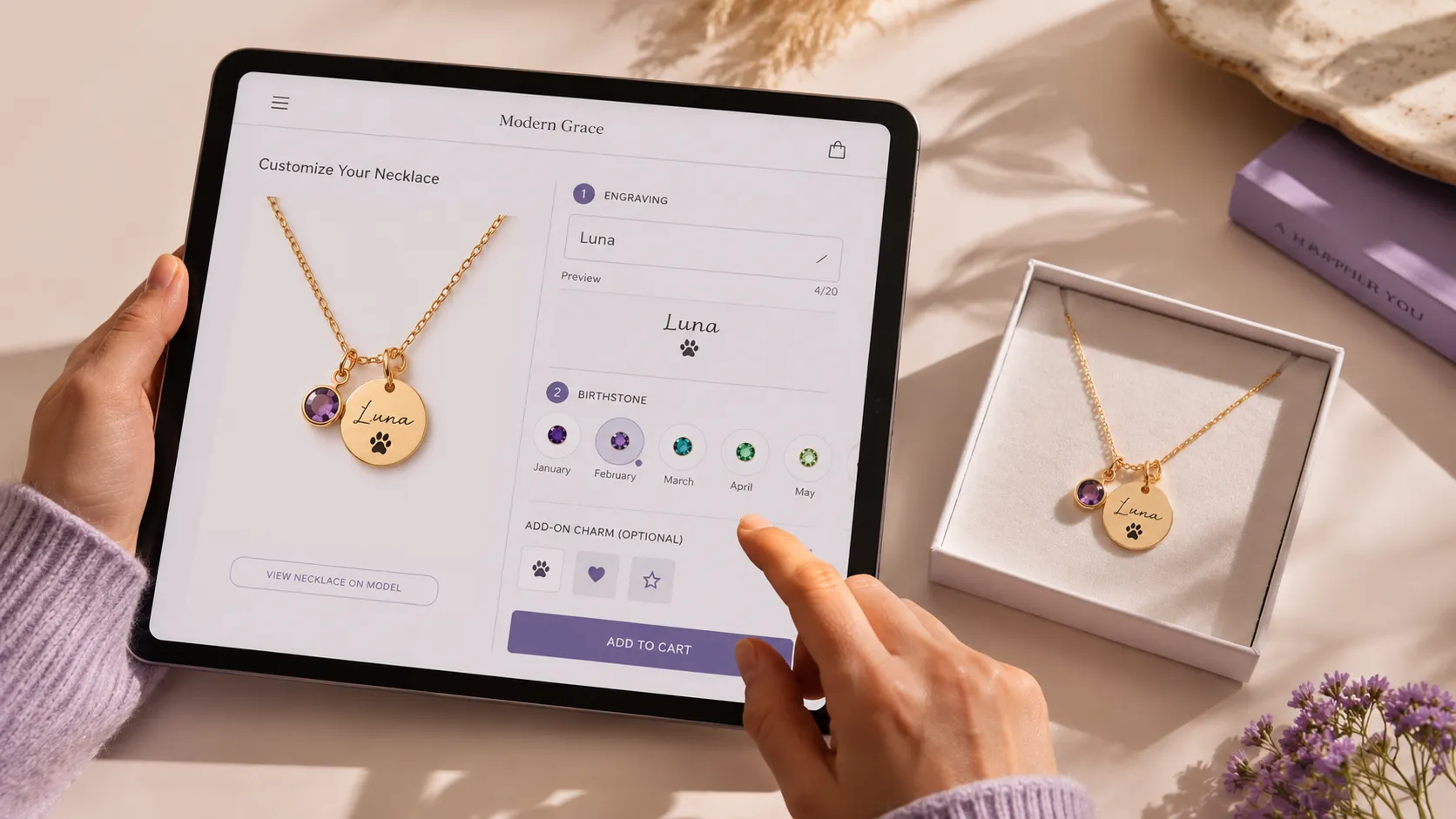
Open the demo of any app you're considering and picture your specific product on it. Not a generic mug, your necklace, your canvas print, your specific customization options. Does the live preview update smoothly? Can customers zoom in on a photo before confirming?
Some tools handle text and photo based personalization better than others, and that's usually the detail that shows up once you're testing with your own catalog instead of the sample products in a demo. Figure out which one matches what you actually sell before anything else.
Ask what happens after checkout
A lot of stores get sold on the front end experience and forget to ask about the back end. Once an order comes in with a custom photo or engraving text, where does that file go? Does it land in a format your production team or POD partner can use right away, or does someone need to open it in Photoshop first? If you've looked at Zakeke or similar tools and felt like this part was still fuzzy, it's worth pinning down with a real answer before you commit.

Talk to a real person before you buy
This one matters more than people expect. When you're mid setup and something isn't rendering right, or you need help connecting a specific integration, you want to talk to someone who actually knows the product, not wait on a ticket queue for two days.
With Customily, support means live chat with real humans, not a bot script. The team covers close to 24/7 across US and Pacific hours, speaks multiple languages, and if you're just getting started, you get one on one training plus live classes so you're not left guessing how to set things up. The goal is getting your store selling personalized products quickly, not spending your first month troubleshooting alone.
A good way to test this before deciding: message support with a real setup question during your trial and see how it goes. That interaction tells you more than any features page will.
Think about where your catalog is headed
If you're only personalizing one or two products today but planning to expand into more customizable lines, like adding personalized jewelry sets or expanding your wall art collection, check whether the app scales with that. Some tools get expensive or clunky once you're managing personalization across a wider catalog, so it's worth asking now rather than migrating everything again in a year.
Why live preview and automation matter more than they seem
Two things are easy to underestimate when you're comparing these apps on paper, but they change everything once your store is actually running.
The first is live preview. Letting a customer see their own engraving on that necklace or their own photo on that canvas, in real time, before they buy, does something a static product photo never will. It builds an emotional connection to the exact item they're about to own, and that connection is what pushes browsing traffic into an actual purchase. Stores that add real time personalization consistently see more of their visitors convert, because people are buying something that already feels like theirs.
The second is what happens after checkout. Customily takes the order and builds the production file automatically, already formatted for whatever printer or POD partner you work with. You don't need a designer on staff, you don't need to open anything manually, and you don't need extra hands just to keep orders moving. It comes out ready for fulfillment on its own, every time.
A quick rundown of what that looks like in practice:
- Real time live preview, so customers see their exact custom product before buying
- Production files generated automatically, in the format your fulfillment partner needs
- No design team or extra staff required to prep orders for production
- Built in integrations with major POD networks
- Works across Shopify, Etsy, WooCommerce, and Amazon
- Live chat support with real humans, multilingual, plus one on one training when you're getting set up
Run the trial with your own products
Zakeke, Customily, and most of the serious players in this space all offer free trials, and that's really the only way to know for sure. Load in your own jewelry or wall art SKUs, go through the customer flow yourself, and see which one your team can actually manage without a headache.
If you want to start there, Customily's trial includes full access to the personalization builder, POD integrations, and that support team from the first day you sign up. Try it with your real products and see how it feels before locking anything in.
Frequently Asked Questions
What should I look for in a personalization app if I sell jewelry or wall art? Look for live preview that actually shows the real customization, engraving text on the necklace itself, a photo placed correctly on the canvas, not just a generic mockup. That's what makes customers trust what they're buying and follow through with the purchase.
Can customers preview their custom product on mobile? Yes, the live preview is built to work across devices, so someone customizing a necklace or a canvas print from their phone gets the same real time view as on desktop.
Which platforms does Customily work with? It's built for Shopify, Etsy, WooCommerce, and Amazon, so if you're selling across more than one of these, you don't need a separate tool for each.
What happens if something breaks outside regular business hours? Support runs almost around the clock across US and Pacific time zones, with a multilingual team, so you're not stuck waiting a full day for a reply during a launch or a busy week.
How long does it take to get set up? It varies by catalog size, but between the one on one training and the weekly live classes, most stores get their first personalized products live pretty quickly. The free trial is the easiest way to see your own timeline.